> For the complete documentation index, see [llms.txt](https://minimateapps.gitbook.io/mini-image-upload-and-file-upload/llms.txt). Markdown versions of documentation pages are available by appending `.md` to page URLs; this page is available as [Markdown](https://minimateapps.gitbook.io/mini-image-upload-and-file-upload/how-to.../how-to-set-up-an-add-on-price-for-image-upload-fields.md).

# How to set up an add-on price for image upload fields?

Charge customers an additional fee when they use the upload field.Add-on Price Options

* Please go to the "Upload Rules" tab while creating a field
* Click "Add a rule" button
* Scroll to the **Pricing** section and select "Customization fee"

<figure><img src="https://496467855-files.gitbook.io/~/files/v0/b/gitbook-x-prod.appspot.com/o/spaces%2FH4gNmkiCvjHuxfVFianA%2Fuploads%2Fu1gHl9iWMjOGlGxxOVRK%2FAdd-on1.png?alt=media&amp;token=741d7705-6c73-46f8-a500-5a42cd297702" alt=""><figcaption></figcaption></figure>

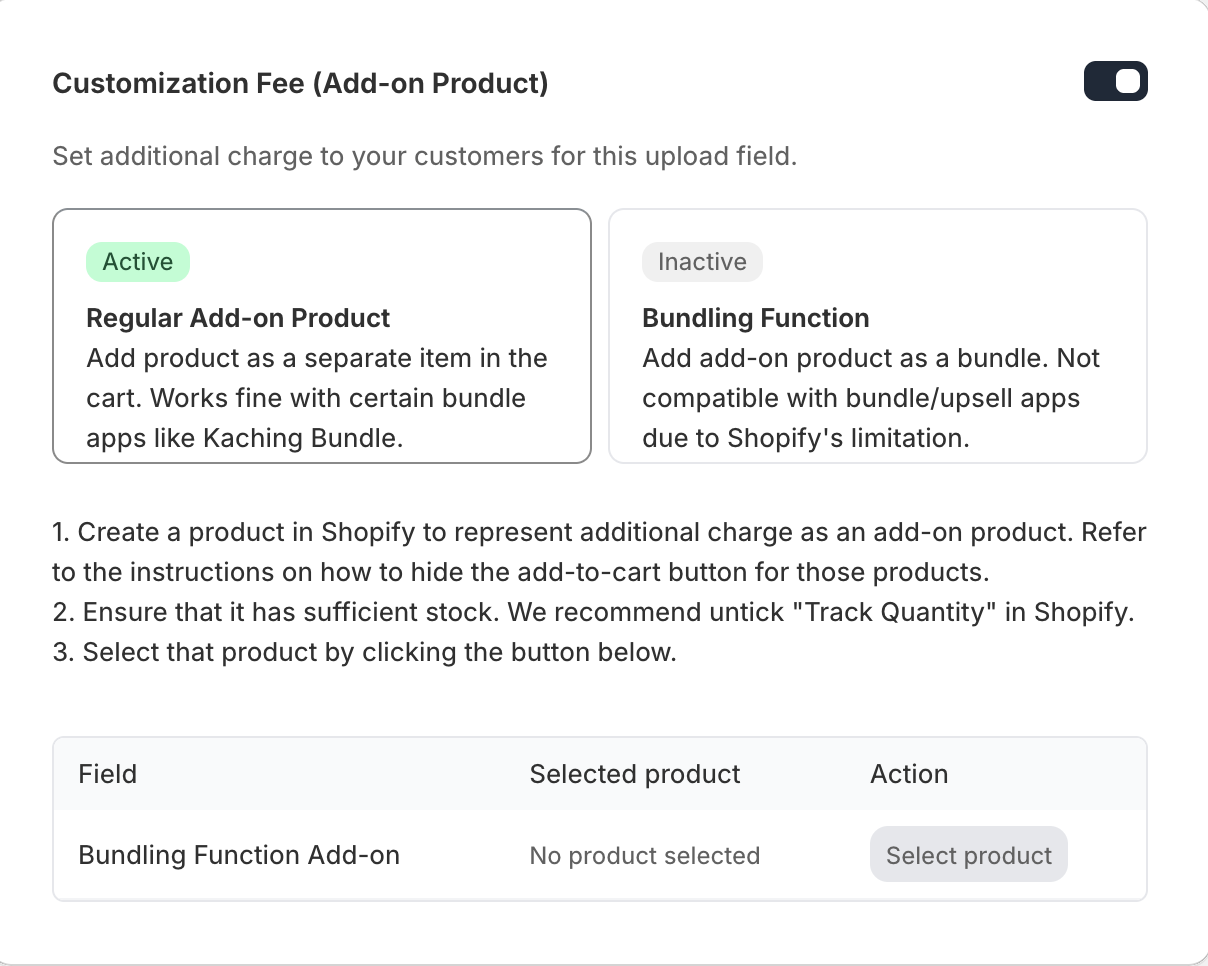
Choose how the add-on charge is applied to the cart:

* **Regular add-on product** — adds the charge as a separate item in the cart. Works fine with most stores and is compatible with certain bundle apps like Kaching Bundle.
* **Bundling function** — adds the charge as a bundle alongside the main product. Not compatible with bundle/upsell apps due to Shopify's limitation.

<figure><img src="https://496467855-files.gitbook.io/~/files/v0/b/gitbook-x-prod.appspot.com/o/spaces%2FH4gNmkiCvjHuxfVFianA%2Fuploads%2FqWC1W1suB57jP4x55ePJ%2FAddon2.png?alt=media&amp;token=50082285-b275-4ace-83bd-66ac0d5b3374" alt=""><figcaption></figcaption></figure>

* Next, set up the product that represents the add-on charge in your Shopify store:
  * Create a product in Shopify to represent the additional charge (for example, "Customization Fee" priced at $5)
  * Make sure it has sufficient stock — we recommend unticking **"Track quantity"** in Shopify so it never runs out
  * Click "Select product" and choose the product you just created
* Once selected, the product will appear in the **Selected product** table. You can change it anytime by clicking "Change product".

{% hint style="info" %}
We recommend hiding the add-on product from your storefront so customers don't see it as a standalone item. You can do this by removing it from all sales channels or all collections in Shopify.
{% endhint %}

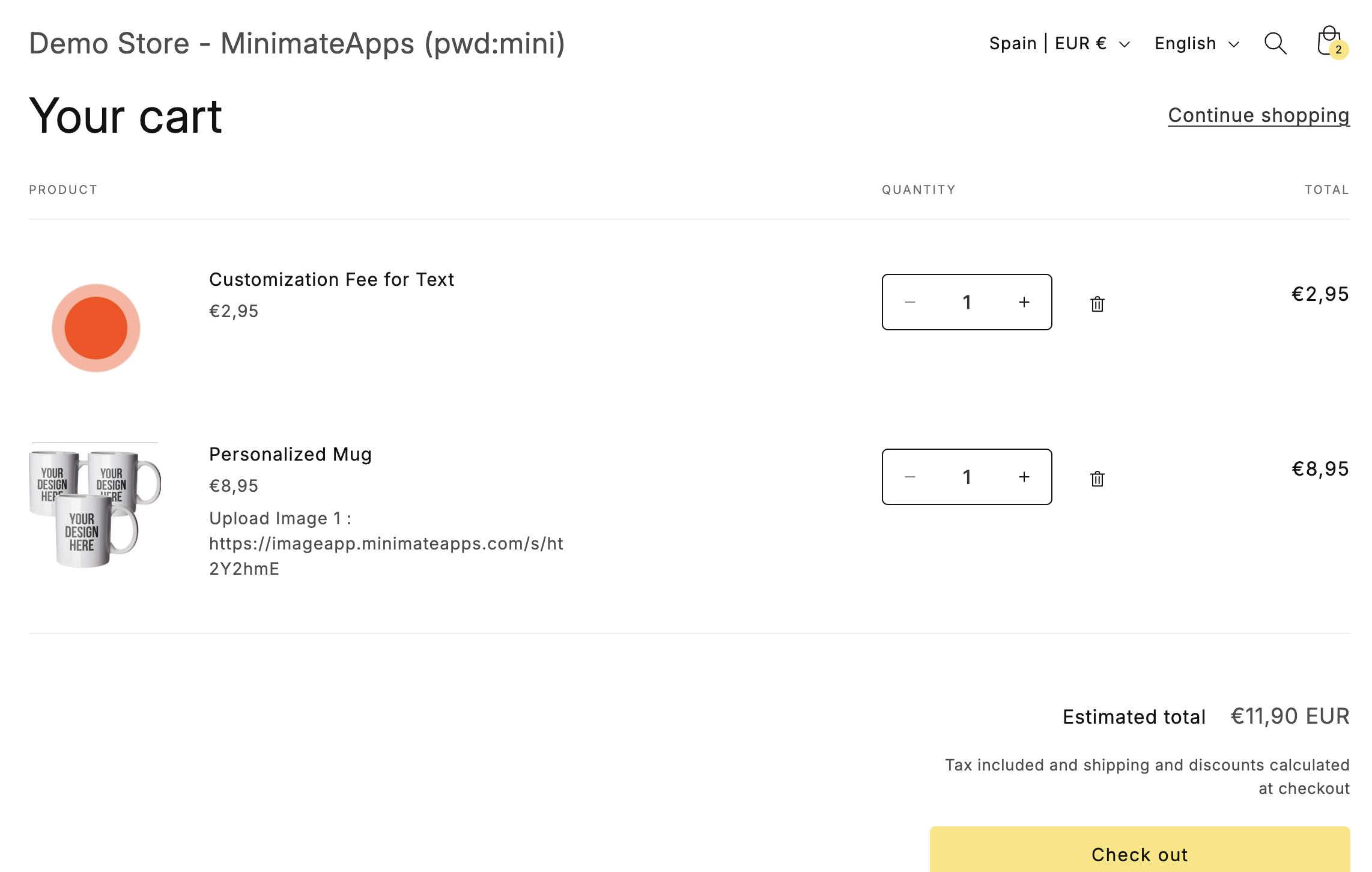
**1. Regular Add-on Product (Recommended)**

This option adds the extra charge as a separate product in the cart.

**How it works**

* The add-on fee appears as a separate line item in the cart
* Customers will see it as an additional product
* It can be removed manually from the cart

**When to use**

* If you are using bundle apps (e.g. Kaching Bundle)
* If you want more flexibility with cart items
* If you don't mind customers being able to remove the add-on

**Important notes**

* Customers can delete the add-on product from the cart
* Compatible with most bundle apps (e.g. Kaching Bundle)
* Displayed as a separate product (not merged with the main item)

<figure><img src="https://496467855-files.gitbook.io/~/files/v0/b/gitbook-x-prod.appspot.com/o/spaces%2FH4gNmkiCvjHuxfVFianA%2Fuploads%2FsRYtH8zdD7wnhHxjhd7i%2FScreenshot%202026-03-27%20at%2019.49.08.png?alt=media&amp;token=5ca3675b-ab26-4515-ac1c-adab797cfd15" alt="How Regular Add-on look at cart"><figcaption><p>How Regular add-on looks</p></figcaption></figure>

{% hint style="info" %}
Regular add-on product is the recommended default. It works reliably across most stores and is compatible with the widest range of themes and apps.
{% endhint %}

**2. Bundling Function (Advanced)**

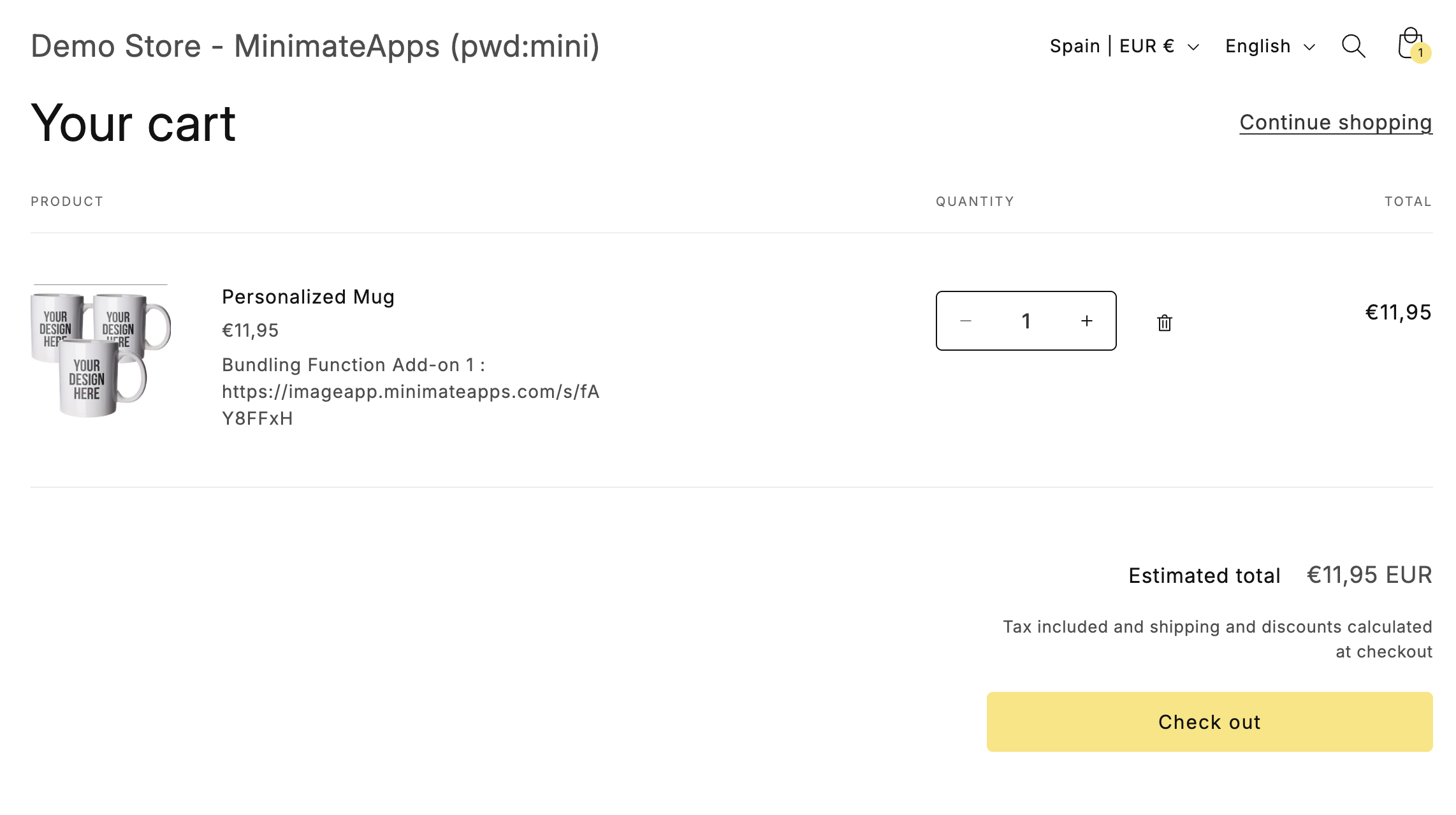
This option adds the extra charge as part of the main product (bundled together).

**How it works**

* The add-on fee is combined with the main product price
* It does not appear as a separate product
* Customers cannot remove the add-on separately

**When to use**

* If you want a cleaner cart experience
* If the add-on should feel like a required part of the product
* If you want to prevent customers from removing the add-on

**Important notes**

* Not compatible with bundle or upsell apps
* This is due to Shopify platform limitations
* Removing the main product also removes the add-on charge

<figure><img src="https://496467855-files.gitbook.io/~/files/v0/b/gitbook-x-prod.appspot.com/o/spaces%2FH4gNmkiCvjHuxfVFianA%2Fuploads%2F1dLHHCcv3gtzqVDR7gW8%2FScreenshot%202026-03-27%20at%2019.50.04.png?alt=media&amp;token=53fd59da-d9f0-43a4-823b-c191d8b0949c" alt=""><figcaption><p>How  bundling add-on looks</p></figcaption></figure>

{% hint style="warning" %}
If your store already uses another bundling app or function (like Shopify Bundles), the Bundling function option may not work. In that case, please switch to "Regular add-on product".
{% endhint %}