> For the complete documentation index, see [llms.txt](https://minimateapps.gitbook.io/customfield/llms.txt). Markdown versions of documentation pages are available by appending `.md` to page URLs; this page is available as [Markdown](https://minimateapps.gitbook.io/customfield/how-to.../how-to-add-translations.md).
# How to add translations?
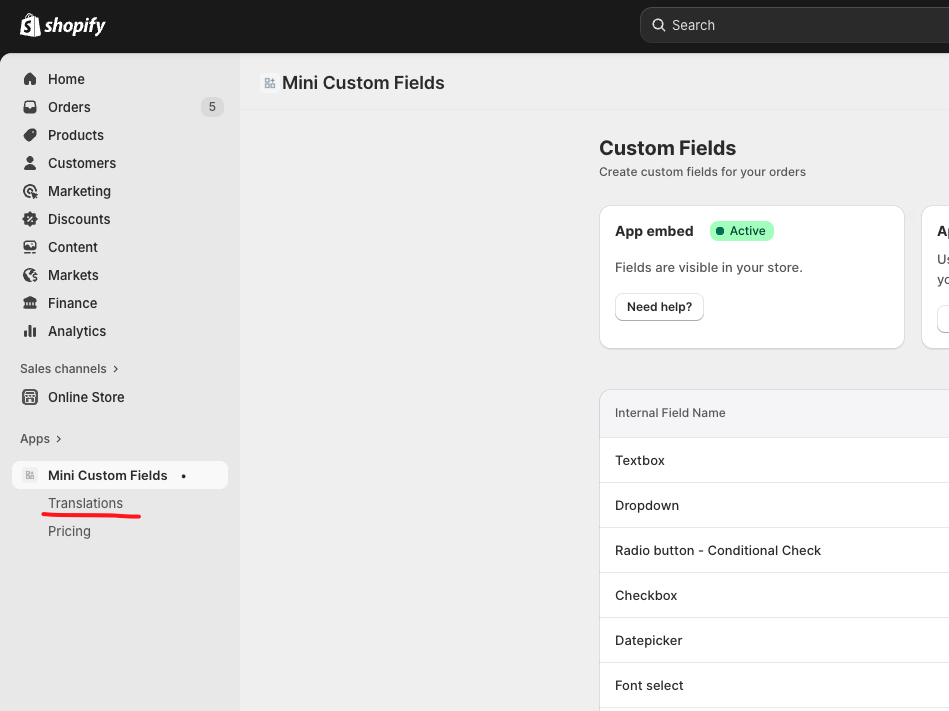
**Click the “Translations” tab** on the left side of the app.
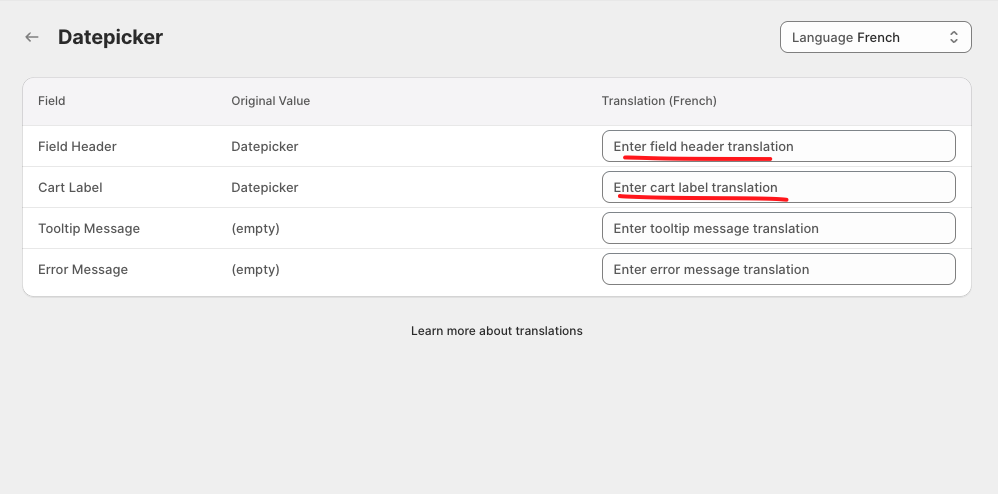
You will see a list of all the fields you have created. **Select the language you want to translate your fields into.**
For example, if your store’s main language is English and you want to add French translations, simply choose **“French”** from the dropdown menu.
\
After selecting a language and choosing the field you want to translate, you will see the **translation table**.\
**Enter your translation** into the text fields provided.
{% hint style="warning" %}
* **Cart Label** refers to the text shown in the cart, checkout, and order pages.
* Each Cart Label must be **unique per field**, not per language.
* You may use the same text as your Field Header, but you **cannot** reuse a Cart Label from another field.
{% endhint %}
{% hint style="info" %}
If the language you need is not available in the dropdown, please contact us via live chat or email at ****.
{% endhint %}